
First-Party vs Third-Party Cookies: What Marketers Need to Know in 2026
Understand the critical differences between first-party and third-party cookies, why browsers are killing third-party cookies, and why first-party HttpOnly cookies are the future of tracking.
ONClix Team

We have all sat in those monthly marketing meetings where the numbers just don’t add up. You look at your bank account and see sales, but your ad platform dashboards show zero conversions.
It is a frustrating disconnect.
Most business owners we speak with blame their ad agencies or the creative work itself.
But the real culprit is usually technical.
The distinction between first-party and third-party cookies has become the single most important concept for protecting your revenue in 2026.
This isn’t just IT jargon anymore.
Getting this wrong means losing attribution data and wasting budget on ads that actually work but look like failures. Purpose-built marketing attribution software solves this by using durable first-party data to connect every conversion to its true source.
We are going to break down exactly why this data loss happens and the specific server-side fix that solves it.
How Cookies Work at a Technical Level
A cookie is simply a small text file that a web server sends to a browser. The browser stores it and sends it back with subsequent requests to the same domain. These files carry information like session IDs, user preferences, and tracking identifiers.
Think of it like a visitor pass for a gated community.
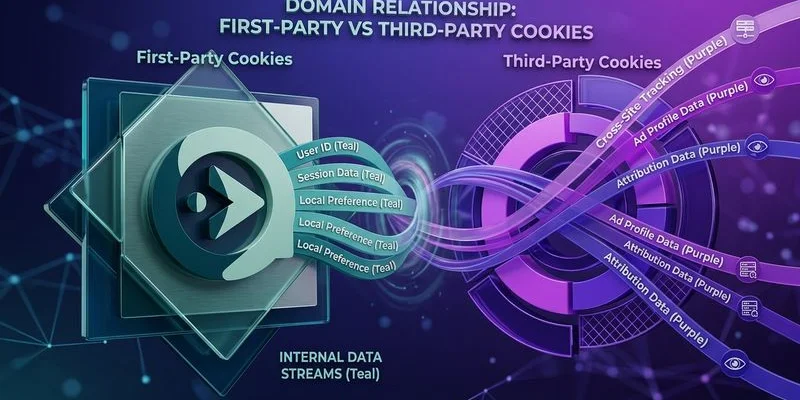
First-party cookies are like giving a key to a house guest you invited. If a customer is on yoursite.com, any cookie set by yoursite.com is first-party. These are essential for basic website functionality. They maintain login sessions, remember shopping cart contents, and store user preferences.
Third-party cookies are different.
These are set by a domain other than the one the user is currently visiting. If a user is on yoursite.com and a Facebook pixel loads from facebook.com, any cookie that Facebook sets is third-party relative to your site.
Ad platforms rely on these to follow users across the internet.
The Decline of Third-Party Cookies
Third-party cookies have been on the chopping block for years. The timeline of restrictions tells a clear story of shrinking data visibility for US businesses.
Safari blocked third-party cookies by default in 2020 through Intelligent Tracking Prevention (ITP).
Firefox followed suit with Enhanced Tracking Protection.
We watched Chrome shift its strategy significantly over the last two years.
Rather than the hard block they originally promised, Chrome introduced a “User Choice” model in late 2024 and early 2025. This prompts users to choose whether they want to be tracked upon opening the browser.
The result is effectively the same as a ban.
Recent data from 2025 shows that opt-out rates in the US hover around 80% when users are presented with a clear “Allow” or “Deny” prompt.
This means third-party cookies are no longer a reliable tracking mechanism on any major browser.
If your attribution system depends on them, you are missing data for nearly 8 out of 10 customers.
Browser Restriction Comparison
| Browser | Third-Party Status | Impact on Your Marketing |
|---|---|---|
| Safari (iOS/macOS) | Fully Blocked | Zero third-party tracking. Marketing pixels are blind here. |
| Firefox | Blocked by Default | Minimal data availability. Retargeting is ineffective. |
| Chrome | Restricted via User Choice | High opt-out rates (80%+) reduce signal significantly. |
Why First-Party Cookies Still Matter
First-party cookies remain functional across all browsers. They are treated as essential for website operation and are not subject to the same blocking rules as third-party cookies.
However, there are important nuances in how they are set that directly affect their reliability for tracking.
We often have to explain to clients that not all first-party cookies are treated equally.
JavaScript-Set Cookies vs Server-Set Cookies
This is where many marketers make a critical error.
JavaScript-set cookies are created using document.cookie in the browser code.
Safari’s ITP limits these cookies to a maximum lifespan of 7 days.
If the cookie is set by a script loaded from a known tracking domain, that limit drops to just 24 hours.
This restriction severely impacts your attribution windows.
Server-set cookies (HttpOnly) are different.
These are created by your web server and sent to the browser in an HTTP response header. They can include the HttpOnly flag, which prevents JavaScript from accessing them.
Safari treats these cookies more favorably because they demonstrate a genuine first-party server relationship.
They can persist for up to 400 days in many cases.
The difference is enormous for your bottom line.
- JavaScript Cookie: Expire in 7 days. You lose attribution for any user who takes longer than a week to buy.
- Server-Set HttpOnly Cookie: Persists for 400 days. You capture the full customer journey.
Practical Implications for Attribution
Consider a typical customer journey for a high-value service or B2B product. A prospect clicks a Google ad on Monday. They visit your site, browse some content, and leave.
Two weeks later, they return via an organic search and download a whitepaper.
Three weeks after that, they request a demo.
Here is how the two different cookie types handle this scenario.
Scenario A: JavaScript-Set Cookie (The Problem)
- Day 1: User clicks ad. Cookie set (expires in 7 days).
- Day 8: Cookie is automatically deleted by the browser.
- Day 14: User returns. No record of the ad click exists.
- Result: The demo request is attributed to “Direct” or “Organic.” Google Ads gets zero credit. You cut the budget for a campaign that was actually working.
Scenario B: Server-Set HttpOnly Cookie (The Solution)
- Day 1: User clicks ad. Server sets a secure cookie (expires in 400 days).
- Day 35: User requests a demo. The server reads the original cookie.
- Result: The demo request is correctly attributed to the Google Ads click. Your Return on Ad Spend (ROAS) data is accurate.

How to Implement First-Party HttpOnly Cookies
Implementing server-set first-party cookies requires a server-side component on your domain. We recommend the following approach for most businesses to regain control of their data.
Step 1: Capture click parameters.
When a user arrives on your site, your server must extract tracking parameters from the incoming URL immediately. Look for gclid (Google), fbclid (Facebook), and standard utm values.
Step 2: Generate a session identifier. Create a unique identifier for this visitor session. Store the click parameters associated with it in your own database or CRM.
Step 3: Set an HttpOnly cookie. Return an HTTP response header that sets a cookie containing the session identifier. It should look like this:
Set-Cookie: _onclix_id=abc123; Domain=yoursite.com; Path=/; Max-Age=34560000; HttpOnly; Secure; SameSite=Lax
Step 4: Read the cookie on conversion.
When the user converts, your server reads the _onclix_id cookie. It looks up the associated click parameters and sends them to the appropriate ad platform via their server-side conversion API (CAPI).
The CNAME Advantage
For even stronger first-party status, set up a CNAME record that points a subdomain of your site to your tracking server. For example, track.yoursite.com resolves to your tracking infrastructure.
Because the tracking endpoint is on your domain, cookies set by this endpoint are indisputably first-party.
This technical configuration offers specific benefits:
- Bypassing Ad Blockers: Requests to your own domain are less likely to be blocked than requests to third-party domains.
- Extended Lifespan: Browsers are less aggressive against subdomains that clearly belong to the main site.
- Data Control: You own the data pipeline rather than renting it from a third-party pixel.
What This Means Going Forward
The industry trajectory is clear.
Third-party cookies are dead.
JavaScript-set first-party cookies are unreliable.
We believe the only durable approach is server-set, first-party, HttpOnly cookies combined with server-side conversion APIs.
A complete server-side tracking implementation pairs these durable cookies with conversion APIs for maximum data recovery. This is not a theoretical concern.
Every day you operate without server-set first-party cookies, you lose attribution data.
This directly affects your ability to optimize campaigns and allocate budget effectively.
The technical implementation takes work, but it is well-defined. Managed server-side tracking platforms like ONClix handle this infrastructure for you. They set proper first-party cookies and route conversion data through server-side APIs.
Whatever approach you choose, making this transition should be a priority.
Accurate measurement is the only way to compete in the current digital economy.