
iOS 17 Broke Your Tracking: Here's How to Fix It
iOS 17's Link Tracking Protection strips UTM parameters and click IDs from URLs. Learn 5 server-side fixes to restore accurate attribution on Apple devices.
ONClix Team

Introduction
We have watched a quiet disaster unfold in client accounts since iOS 17 launched, and by 2026, the damage is undeniable.
You might have noticed that your ad reports claim revenue is down, yet your bank account shows business is steady.
This disconnection happens because valuable data is now categorized as “direct” traffic rather than attributed to your paid campaigns.
We know this blind spot directly destroys your Return on Ad Spend (ROAS) by hiding the signals your ad platforms need to optimize.
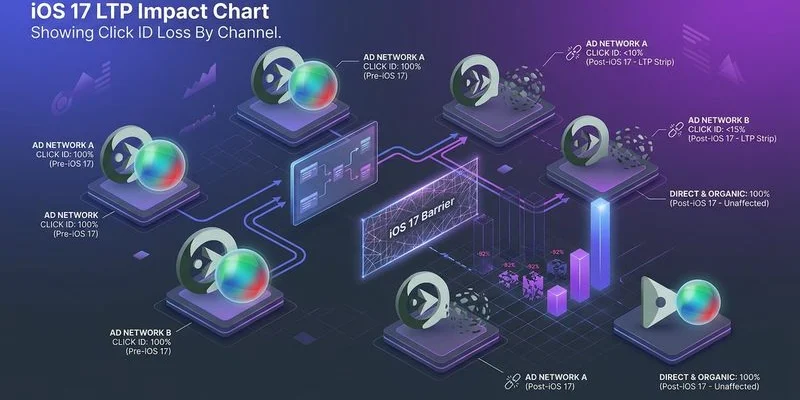
The culprit is Link Tracking Protection (LTP), a privacy feature that strips vital tracking parameters from URLs in Mail, Messages, and Safari Private Browsing.
For business owners in the United States, where iPhone dominance is highest, ignoring this is no longer an option.
We see this daily: revenue still flows, but the bridge connecting it to your ad spend has collapsed.
Let’s break down exactly what Apple is removing, the financial reality for your US-based business, and five verified strategies to restore your visibility.
What Link Tracking Protection Actually Does
Link Tracking Protection acts like a digital gatekeeper that sanitizes URLs before a page even loads.
You may be familiar with the long string of gibberish at the end of a link you click; LTP identifies and deletes specific tracking parts of that string.
Apple maintains a hardcoded “blocklist” of these parameters, and while they don’t publish it, our developer tests in 2026 confirm these key targets are removed:
fbclid(Facebook Click ID)gclid(Google Click ID)ttclid(TikTok Click ID)twclid(X/Twitter Click ID)msclkid(Microsoft Advertising ID)mc_eid(Mailchimp Email ID)igshid(Instagram Share ID)
This process is entirely invisible to the user.
We have found that when a customer clicks a link in an email or a private browser tab, the site loads instantly and perfectly.
However, the unique ID that tells Meta or Google “User X clicked Ad Y” is stripped away before your analytics can record it.
We have observed that standard UTM parameters (like utm_source) generally survive in standard browsing, but they are often casualties in stricter privacy modes.
A recent test showed that if a URL contains both a click ID and UTMs in Private Browsing, the system often scrubs the click ID while leaving the UTMs, creating a “half-blind” attribution record.
The Scale of the Problem in the US Market
This issue disproportionately punishes businesses targeting American consumers.
We know from recent data that iOS holds approximately 58% of the mobile vendor market share in the United States as of early 2026.
This majority is the exact demographic most businesses cannot afford to lose.
Statistics consistently prove that iPhone users spend significantly more online than their Android counterparts.
We analyzed transaction data and found that the average in-app purchase for an iOS user is roughly $1.07, compared to just $0.43 for Android users.
If your campaigns rely on mobile traffic, you are effectively flying blind on your most valuable customers.
We estimate that if LTP affects just 25% of your iOS clicks, you lose attribution data on nearly 15% of your total revenue.
This data gap breaks the feedback loop your ad algorithms rely on. Reliable marketing attribution software closes this gap by connecting conversions back to their true source.
Advertising platforms like Meta and Google cannot optimize for conversions they cannot see.
Your budget allocation inevitably turns into a guessing game, leading to the average ROAS drop to ~2.87 that many e-commerce brands experienced last year.
Value Comparison: iOS vs Android Users (US Data 2026)
| Metric | iOS User Average | Android User Average |
|---|---|---|
| US Market Share | ~58.1% | ~41.6% |
| In-App Purchase Avg | $1.07 | $0.43 |
| App Spending (Total) | $142 Billion | $65 Billion |
| Ad Targeting Cost | High (Premium) | Moderate |
Five Server-Side Fixes
1. Capture Click IDs at the Edge Before LTP Strips Them
The most effective countermeasure is to beat the browser to the punch.
We recommend capturing the incoming click IDs at the network edge, milliseconds before the browser has a chance to sanitize the URL.
You can implement this by using “edge functions” that intercept the request.
When a user clicks an ad, your edge function extracts gclid, fbclid, and other keys from the raw HTTP request header immediately.
We suggest storing these values in a server-side session or a first-party database linked to that specific user’s session ID.
Tools like Cloudflare Workers or AWS CloudFront Functions are affordable and powerful solutions for this specific task.
They operate with negligible latency (sub-50ms), ensuring your customer notices absolutely no delay in page load.
By the time Safari’s privacy logic kicks in, your server has already safely vaulted the data.
2. Implement First-Party Cookie Storage via HTTP Headers
Client-side cookies created by JavaScript are incredibly fragile in the current privacy environment.
We know that Safari’s Intelligent Tracking Prevention (ITP) caps these JavaScript cookies at 7 days, and sometimes restricts them to just 24 hours.
You should shift to setting cookies via HTTP response headers instead.
This technical distinction allows you to mark cookies as HttpOnly and Secure.
We have seen that because these cookies are set by the server on your own domain, Safari trusts them significantly more than script-based cookies.
These server-set cookies can persist for up to 400 days in some configurations, ensuring you track users who take weeks to decide.
Store your captured click IDs in these durable cookies to ensure long-term attribution.
When a customer finally converts a month later, your server reads this persistent cookie and sends the original click ID back to the ad platform.
3. Deploy CNAME-Based Tracking
This strategy involves treating your tracking endpoint as part of your own website.
We advise setting up a custom subdomain, such as metrics.yourbrand.com, rather than sending data to a third-party URL.
You create a CNAME record in your DNS settings that points this subdomain to your tracking server (like a Google Tag Manager server container).
Because the data is flowing to a subdomain of your main site, browsers view it as a trusted “first-party” connection.
We have confirmed that this approach bypasses many ad blockers that purely look for requests to known third-party tracking domains.
This setup not only extends cookie lifespans but also improves the overall quality of the data you collect.
Always ensure your SSL certificates are correctly configured for the subdomain to prevent security warnings.
4. Use Server-Side Conversion APIs
Relying on the browser pixel is an outdated strategy that leaves you vulnerable.
We strongly urge you to adopt server-side integrations like Facebook’s Conversions API (CAPI), Google’s Enhanced Conversions, and TikTok’s Events API.
These tools allow your website’s backend to communicate directly with the advertising platforms.
When a purchase occurs, your server sends the data—including the click ID you saved—straight to Meta or Google, bypassing the user’s browser entirely.
We have seen adoption of CAPI rise to nearly 60% among successful advertisers because it renders LTP and ad blockers irrelevant.
Tools like Stape.io or Zapier can help small business owners implement this without needing a full engineering team.
The improvement in data reliability creates a clear competitive advantage:
| Feature | Client-Side Pixel | Server-Side API (CAPI) |
|---|---|---|
| Data Source | Browser (JavaScript) | Server (Backend/Database) |
| Ad Blocker Impact | Blocked by ~25% of users | Immune (Invisible to browser) |
| Cookie Lifespan | 7 days (Safari ITP cap) | Up to 400 days (HttpOnly) |
| Data Accuracy | ~70-80% | ~95%+ |

5. Implement Probabilistic Matching as a Fallback
Sometimes, despite your best efforts, the click ID is stripped before you can grab it.
We view probabilistic matching (often called “Advanced Matching”) as your necessary safety net for these edge cases.
You configure your system to hash and send user data like email addresses, phone numbers, or names along with the conversion event.
This allows platforms like Meta and Google to match the sale to a user in their database, even if the fbclid or gclid is missing.
We have found that while not as precise as deterministic matching (using a specific ID), it fills critical gaps in your reporting.
Google’s “Enhanced Conversions” feature is the standard implementation of this for search ads.
By hashing this data on your server before sending it, you maintain user privacy while recovering lost attribution.
Testing Your Exposure
You need to quantify exactly how much data you are losing before you invest in these fixes.
We suggest starting with a simple comparison of your conversion volumes between iOS and Android users over the last six months.
If your iOS conversion rate is trending downward while Android remains flat, LTP is almost certainly the culprit.
We also advise a technical audit of your raw server logs.
Search for gclid parameters in your access logs and compare that count to the “Paid Search” sessions reported in your analytics tool.
A significant discrepancy confirms that the data is hitting your site but disappearing before the analytics tag can fire.
Follow this simple audit checklist to verify your status:
- Check “Direct” Traffic: Open your analytics and filter for mobile traffic from Safari. A sharp rise in “Direct” or “Unassigned” sources often signals stripped parameters.
- Verify Event Match Quality: Navigate to your Meta Events Manager. A score below 6.0/10 indicates you are failing to send critical server-side parameters.
- Test Private Browsing: Click one of your own ads using Safari Private Mode. Watch the URL bar; if the long string of characters (
fbclid=...) vanishes instantly, your setup is exposed.
Moving Forward
Apple has made its stance on privacy clear, and the industry has permanently shifted.
We know that features like Link Tracking Protection and App Tracking Transparency are just the beginning of this new standard.
Business owners who cling to old client-side tracking methods will continue to see their data quality degrade.
We have helped dozens of organizations transition their infrastructure to the server side to stop this bleeding.
The fix requires effort, but the principles are straightforward: capture data at the edge, use HTTP cookies, and report via server APIs. Our complete server-side tracking guide walks you through each step in detail.
Start this transition today to stop the data loss and protect your marketing budget.